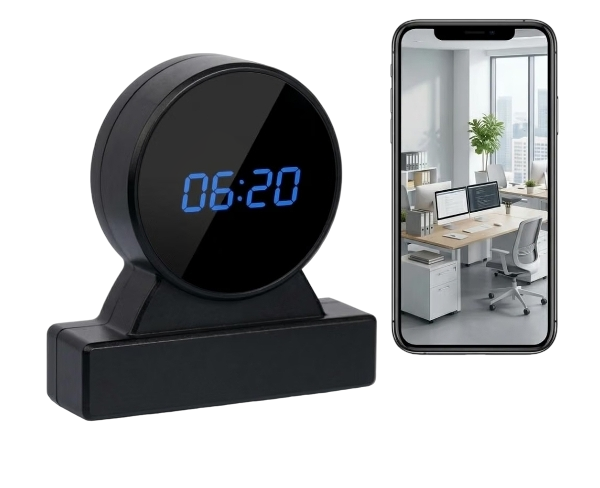
Hidden Camera Clock
Hidden Camera Clock
The Hidden Camera Clock is a discreet clock-style device designed for users looking for a compact security monitoring solution. Combining the familiar appearance of a digital clock with camera functionality, this type of device may offer a convenient way to monitor a designated space when used responsibly and with proper authorization.
Discreet Clock-Style Design
Designed to resemble an everyday digital clock, this device can blend into suitable environments without the appearance of a traditional security camera. Its clock-style design makes it suitable for authorized security monitoring in permitted spaces, such as your own office, private property, or designated storage area.
Key Features
- Clock-Style Appearance: Designed to look like a regular digital clock for a simple and familiar appearance.
- Compact Design: A space-saving design that can fit on a suitable desk, shelf, or tabletop.
- Camera Functionality: Includes camera features intended for authorized monitoring, depending on the selected model.
- Everyday Convenience: Combines a clock-style device with additional security-related functionality.
- Indoor Use: Intended for suitable indoor environments according to the manufacturer’s instructions.
- Simple Placement: Can be positioned on a stable surface in an area where monitoring is legally permitted.
Practical Uses
- Home Security: For monitoring your own property with appropriate notice and consent.
- Office Monitoring: For authorized security monitoring in permitted workplace areas.
- Property Protection: May help monitor designated spaces where you have legal permission to install a camera.
- Personal Security: Can be considered as part of a broader, transparent security setup.
Important Product Details
Camera resolution, recording format, storage capacity, Wi-Fi connectivity, mobile application support, night vision, motion detection, battery life, and power requirements vary by model. Please check the selected product variation and manufacturer’s specifications before purchasing.
Setup and Use
- Read the manufacturer’s setup instructions carefully.
- Place the clock on a stable surface in an authorized monitoring area.
- Connect the device to its required power source, if applicable.
- Configure recording and storage settings according to the manufacturer’s instructions.
- Test the device and confirm that it operates correctly.
Privacy and Responsible Use
Use this device only in locations where you own the property or have clear legal authorization to monitor. Respect the privacy of family members, visitors, employees, and other individuals. Do not use hidden cameras in bedrooms, bathrooms, changing rooms, or other private spaces. Follow applicable recording, consent, and privacy laws before installing or operating the device.
Frequently Asked Questions
Does every hidden camera clock support Wi-Fi?
No. Wi-Fi connectivity depends on the specific model. Check the product specifications before purchasing.
Does it record video?
Recording capabilities vary by model. Some devices may support memory-card recording or other storage options. Refer to the manufacturer’s details.
Does it have night vision?
Night vision is not available on every model. Check the selected variation for this feature.
Can it be used as a regular clock?
Many clock-style camera devices include a digital clock display, but display functions and settings depend on the model.
Is installation complicated?
Setup requirements vary. Follow the supplied instructions for placement, power, storage, and any available connectivity features.
A Compact Addition to an Authorized Security Setup
The Hidden Camera Clock combines a familiar clock-style design with camera functionality in one compact device. Review the available features, technical specifications, and privacy requirements to choose a model that suits your authorized indoor monitoring needs.

Reviews
There are no reviews yet.