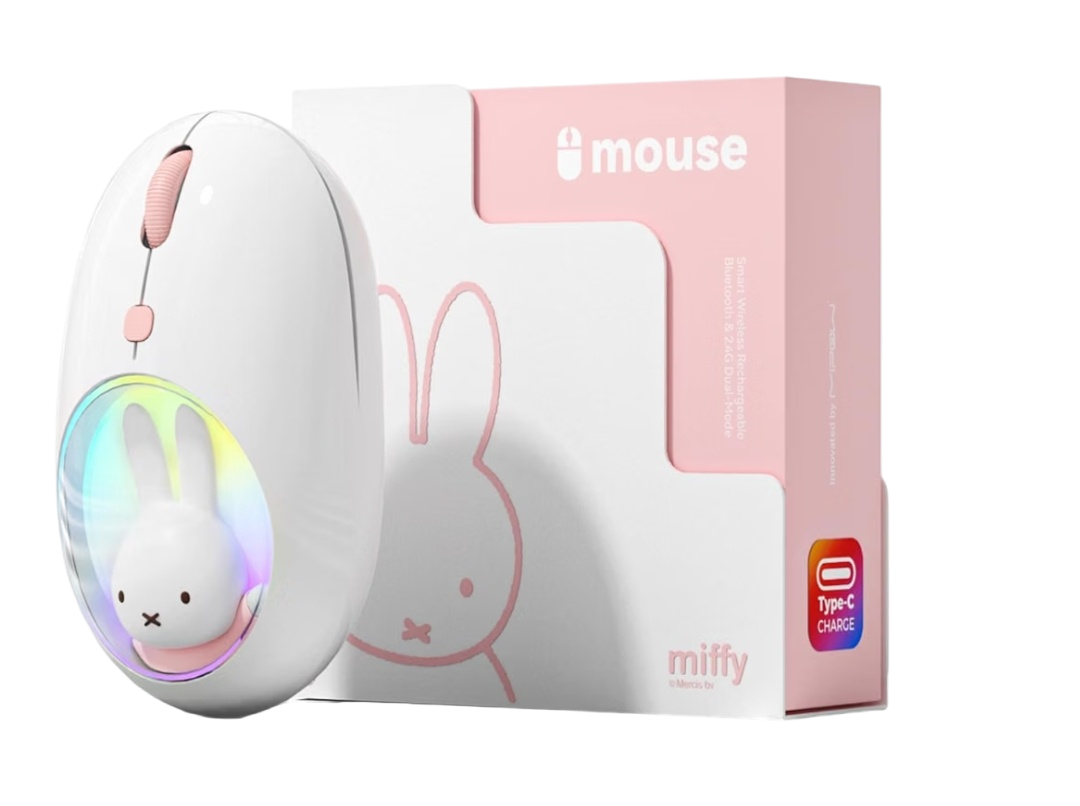
Wireless Bluetooth Optical Mouse
Wireless Bluetooth Optical Mouse – Smooth Control and Everyday Convenience
Make your everyday computing more convenient with the Wireless Bluetooth Optical Mouse, a practical accessory designed for users who value flexibility, comfort, and easy navigation. Whether you are working on a laptop, managing office tasks, browsing the internet, studying online, or enjoying everyday computer activities, a wireless mouse can help create a more organized and comfortable workspace.
With wireless connectivity, an optical tracking system, and a convenient mouse design, this type of accessory offers an alternative to traditional wired mice. It helps reduce cable clutter around your desk and gives you greater freedom to arrange your workspace according to your needs. Before purchasing, check the product specifications to confirm Bluetooth compatibility, supported devices, battery requirements, and available features.
Key Features of Wireless Bluetooth Optical Mouse
- Wireless Bluetooth Connectivity: Designed to connect wirelessly with compatible devices, helping reduce the need for a physical mouse cable.
- Optical Tracking Technology: Uses optical sensing technology to detect movement and control the cursor on your screen.
- Convenient Everyday Navigation: Suitable for common computing activities such as browsing, document editing, online learning, and office work.
- Portable Design: Depending on the model, its compact design may make it convenient to carry in a laptop bag or backpack.
- Comfortable Handling: The mouse shape is an important consideration for users who spend time working, studying, or browsing on a computer.
- Reduced Cable Clutter: A wireless setup helps keep your desk more organized and provides additional flexibility when positioning your mouse.
- Easy Device Setup: Compatible Bluetooth models can generally be paired through the device’s Bluetooth settings by following the manufacturer’s instructions.
Why Choose a Wireless Bluetooth Optical Mouse?
A reliable mouse can make everyday computer tasks easier to manage. From opening files and switching between applications to browsing websites and editing documents, a mouse provides convenient cursor control for a wide range of activities.
A wireless Bluetooth model is particularly useful for people who prefer a cleaner workspace without an extra cable. It may be suitable for a home office, school desk, workplace, or laptop setup. Compatibility varies between models, so confirm that the mouse supports your computer, tablet, or other intended device before ordering.
Wireless Convenience for Work and Study
Whether you work remotely, attend online classes, prepare presentations, or manage personal projects, a wireless mouse can be a helpful addition to your computer accessories. It allows you to position your mouse comfortably without being restricted by the length of a wired connection.
For students and professionals, convenient cursor control can make tasks such as selecting text, navigating spreadsheets, managing files, and working with multiple browser tabs more straightforward. The actual experience depends on the mouse’s design, tracking performance, connectivity, and compatibility with your device.
Optical Tracking for Everyday Computer Tasks
Optical mice use a sensor to detect movement across a surface and translate it into cursor movement on the screen. This technology is commonly used in everyday computer accessories because it supports convenient navigation without the need for a traditional mechanical tracking ball.
For the best experience, use the mouse on a suitable, stable surface. Tracking performance can vary depending on the sensor and surface material, so check the manufacturer’s recommendations if you experience inconsistent cursor movement.
Suitable for Different Everyday Uses
- Office Work: Navigate documents, spreadsheets, presentations, and business applications with convenient cursor control.
- Online Learning: Move between educational websites, digital notes, assignments, and video lessons.
- Home Computing: Browse websites, manage personal files, shop online, and complete everyday computer tasks.
- Travel and Portability: Depending on its size, the mouse may be easy to carry alongside a compatible laptop.
- Creative Projects: Use it for general navigation in design software, photo applications, and other creative programs, subject to the precision requirements of your work.
- Everyday Productivity: Support common tasks that involve selecting, clicking, scrolling, and moving between applications.
How to Connect Your Wireless Bluetooth Mouse
- Check Compatibility: Make sure your computer or other device supports the mouse’s Bluetooth requirements.
- Prepare the Mouse: Insert the required batteries or charge the mouse if the model uses a rechargeable battery.
- Turn It On: Switch on the mouse and activate pairing mode according to the manufacturer’s instructions.
- Open Bluetooth Settings: On your compatible device, open Bluetooth settings and search for available devices.
- Select the Mouse: Choose the mouse from the available device list and complete the pairing process if prompted.
- Test Cursor Movement: Move the mouse and test the buttons and scroll wheel, if included, to confirm that everything works correctly.
Comfort and Workspace Organization
Choosing a mouse that suits your hand size and working habits can help make everyday computer use more comfortable. Consider the mouse’s dimensions, shape, button placement, and overall weight when comparing models.
Keep your workspace organized by placing the mouse on a suitable surface and positioning your keyboard and screen comfortably. If you spend long periods using a computer, take regular breaks and adjust your posture to support a more comfortable working routine.
How to Choose the Right Wireless Mouse
- Check Bluetooth Support: Confirm whether the mouse connects directly through Bluetooth or requires a separate USB receiver.
- Review Compatibility: Check the supported operating systems and device requirements before purchasing.
- Consider Battery Life: Review whether the mouse uses replaceable batteries or a rechargeable battery and check any available battery-life information.
- Look at the Design: Consider size, shape, weight, button layout, and whether the mouse is suitable for your preferred hand.
- Check Tracking Specifications: Review the sensor and sensitivity information if cursor precision is important for your work.
- Review Additional Features: Check whether the model includes a scroll wheel, adjustable sensitivity, extra buttons, or other functions you need.
What to Check Before Placing Your Order
Before purchasing, review the product description, available images, dimensions, connectivity details, battery requirements, supported devices, and included accessories. Confirm whether batteries, a charging cable, or a USB receiver are included in the package.
Product specifications vary between models, so do not assume that every wireless optical mouse offers the same connection options, tracking sensitivity, button layout, or battery performance. Checking these details can help you select an option that matches your requirements.
A Practical Addition to Your Computer Accessories
The Wireless Bluetooth Optical Mouse is worth considering if you want a convenient wireless accessory for everyday computing. Its combination of wireless connectivity and optical tracking makes this category suitable for a variety of common work, study, and home computing activities.
Upgrade Your Workspace: Explore the available specifications, check compatibility with your device, and choose a mouse that suits your everyday needs. A well-matched computer accessory can help you maintain a more organized workspace and enjoy convenient navigation throughout your daily tasks.



Reviews
There are no reviews yet.